

Black Friday is six weeks out. Your Black Friday Cyber Monday (BFCM) promo is half-planned in a doc somewhere, the reorder on your best-selling SKU is “on the water, probably,” and someone just asked in Slack whether the holiday gift set is still happening. Some brands started planning in August. Plenty didn’t.
Six weeks is enough time to run a clean peak season. Consumable brands should start peak season fulfillment planning at least six weeks before Black Friday, working backward from the date inventory needs to be on their third-party logistics (3PL) provider’s shelves instead of forward from the promo calendar. Most of what goes wrong in late November gets decided weeks earlier: a forecast that never got finalized, an inbound shipment with no receiving appointment, a bundle SKU nobody tested.
Supplements, skincare, haircare, and pet food brands feel a messy peak twice. The customer who buys a gift set in November is the same customer you’re hoping reorders in January.
If you fulfill in-house, read “3PL” as “your warehouse team.” The timeline stays the same.
We run a warehouse floor through holiday fulfillment every year, and this is the timeline we’d hand a brand that showed up six weeks out feeling behind. This guide breaks down:
- What a messy peak costs a consumable brand after the holidays end
- What to lock down each week, from inventory and inbound to kits, carriers, and go-live
- How to handle the December push after Cyber Monday
- How to use the printable checklist version with your team
What Should a Peak Season Fulfillment Checklist Include?
A peak season fulfillment checklist should cover five windows: inventory and inbound, promos and kits, carriers and customer messaging, BFCM week monitoring, and the December push after Cyber Monday.
| Timeframe | Focus | Done by the end of this window |
|---|---|---|
| 6 to 5 weeks out | Inventory and inbound | Final SKU forecast, confirmed supplier ship dates, inbound appointments booked |
| 4 to 3 weeks out | Promos, kits, and automations | Bundle SKUs live, gift sets built, insert and gift-note rules tested |
| 2 weeks out | Carriers, cutoffs, and messaging | Order-by dates published, carrier pickups and backups confirmed |
| BFCM week | Go-live and monitoring | Regular check-ins running, sellout plan agreed on |
| After Cyber Monday | The December push | Backlog cleared, “where is my order” (WISMO) responses ready, final reorder decided |
Why the Next Mere Weeks Decide Your Q4 (and Your January)
A messy peak doesn’t end when Cyber Monday does. It tends to show up in four places:
- Stockouts on hero SKUs (the top sellers that drive most of your revenue) during the days with the most traffic and the most ad spend
- Late orders that arrive after the gift-giving moment has passed
- Refund requests and chargebacks that land in December
- Reviews that sit on your product page well into the new year
For consumable brands, the bigger cost comes later. Consumables make their margin on repeat purchases, so a holiday buyer’s first order doubles as a trial of your product and your operation. A gift box that shows up late or damaged tells that customer your brand is unreliable before they’ve finished the first bottle.
Peak also tests setups that only look stable. An in-house team or 3PL that handles October volume can seem fine right up until BFCM traffic shows where it breaks.
This is the cost brands tend to miss: peak gets judged by revenue during the BFCM window, while the damage from a messy one shows up in Q1 retention numbers. Most of that risk comes down to whether the right inventory is on the shelf at the right time, which is why the first two weeks belong to inventory.
6 and 5 Weeks Out: Lock Inventory and Inbound First
Six and five weeks before Black Friday, the job is to get every unit you plan to sell this peak season moving toward your 3PL’s shelves, with a confirmed arrival date.
- Finalize your forecast by SKU. If your gift set pulls from three products, forecast each component, since running out of any one of them stops the whole set.
- Confirm supplier ship dates in writing. “End of the month” from a co-packer (the manufacturer that produces and packages your product) isn’t a date. Ask for the ship date, the carrier, and the expected delivery date.
- Book inbound appointments with your 3PL. Most warehouses require scheduled delivery appointments, and receiving calendars fill up fast in the fall. Unscheduled deliveries can be refused or charged extra fees.
- Know your receiving cutoff. This is the last date inventory can arrive and still be counted, put away, and sellable for BFCM. Ask your 3PL for it directly.
Our advice from the warehouse floor
If we could get brands to do one thing in these two weeks, it’d be booking inbound appointments as soon as a supplier confirms a ship date, before the receiving calendar fills.
Plan Around the Gap Between Ship Date and Sellable Date
The most common planning mistake in these two weeks is treating the day a supplier ships as the day inventory is available to sell. Between those two dates sit transit time, the delivery appointment, the receiving window, and put-away. During receiving, the warehouse counts units, checks them against the purchase order, records lot numbers and expiration dates, and moves product into pickable locations, a step called put-away. When docks are busy in the fall, that process tends to run on the longer end of your 3PL’s standard window.
Purchase order accuracy matters more than usual here. If the PO says 40 cases and 38 arrive, or the SKUs on the cartons don’t match, receiving slows down while someone sorts out the discrepancy.
Consumable brands have one more thing to check: shelf life. Confirm that inbound lots have enough remaining shelf life to sell through the holidays and still look reasonable in a customer’s cabinet. If your 3PL picks by FEFO (first-expired, first-out), older lots ship first, which is what you want for regular orders. For gift sets, you may want to specify which lot goes into the build so a holiday box doesn’t ship with a near-dated product.
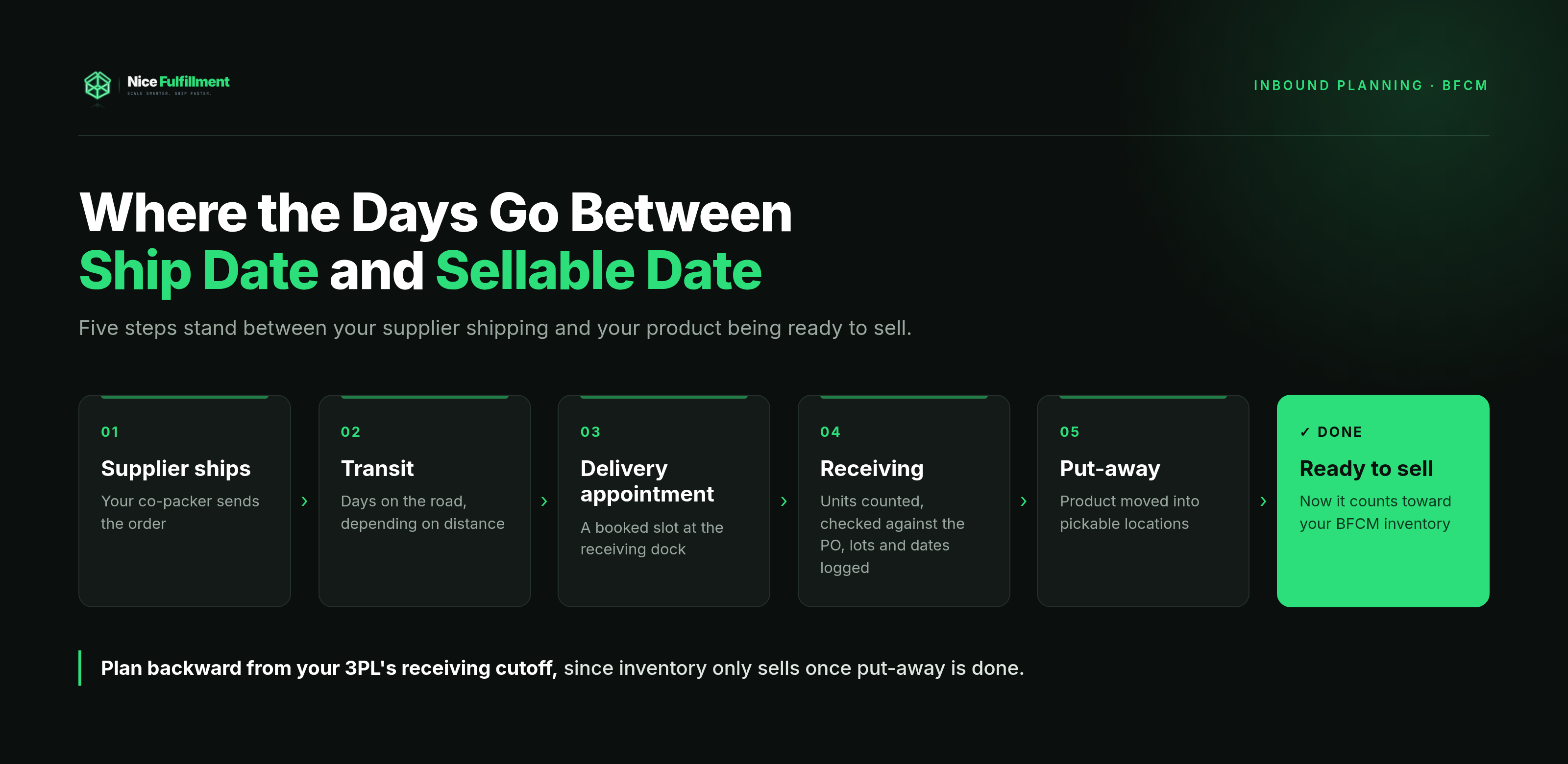
Once you know what’s arriving and when, you know what you can build, which is what weeks four and three are for.
4 and 3 Weeks Out: Build Kits, Bundles, and Automations Before Orders Arrive
Four and three weeks before Black Friday, the work shifts to turning inventory into the offers you’re promoting, then testing that your systems handle them before customers do.
Start by deciding how each bundle gets fulfilled:
| Virtual bundle | Pre-built kit | |
|---|---|---|
| When it’s assembled | At pick time, from component SKUs | Before peak, as its own finished SKU |
| Speed during peak | Slower, since each order needs multiple picks | Faster, since it’s one pick |
| Inventory flexibility | High, since components stay available for other orders | Lower, since components are locked into the kit |
| Works best for | Simple bundles, uncertain demand | Gift sets with custom packaging, high-volume offers |
From there, work through the rest of the setup:
- Create bundle SKUs in your store and your 3PL’s system, with component mapping in place (the record of which individual products make up each bundle).
- Finalize gift sets and confirm that boxes, tissue, and inserts arrive before the build date.
- Load insert and gift-note rules, such as a promo card on orders over a set amount or a gift note printed with no prices on the slip.
- Place test orders through every path: single SKU, bundle, gift order, discount code, and subscription renewal.
Kit build time depends on the product, the number of units, and how involved the assembly is. A three-item box with a sleeve is a very different job from a twelve-piece advent set. Ask your 3PL for a lead time on your specific kit and get on their schedule early, since kitting labor is in high demand this time of year.
Test Every Order Path Before BFCM Traffic Does
Two failures show up again and again. The first is a bundle that doesn’t deduct its components from inventory. Your store shows the serum as in stock because it doesn’t know 300 units are already committed to gift sets, and you oversell. The second hits subscription brands: automation rules meant for BFCM orders also fire on renewals, so a subscriber gets a promo insert, a free gift, or a discount they weren’t supposed to receive. A test order on each path catches both.
With your offers built, what’s left is how quickly they can reach customers, and that depends on carriers.
2 Weeks Out: Confirm Carriers, Cutoffs, and Customer Messaging
Two weeks before Black Friday, your promises to customers need to match what your fulfillment operation and your carriers can deliver.
- Publish order-by dates for each shipping method.
- Confirm carrier pickups and backups with your 3PL, including whether extra pickups are scheduled and what happens if a carrier caps volume.
- Update customer-facing messaging on site banners, product pages, your shipping FAQ, and order confirmation emails.
- Review carrier peak surcharges for your main services, since each carrier sets its own.
Brands get order-by dates wrong most often by publishing a carrier’s holiday deadline as their own. Carriers publish the date a package needs to be in their network to arrive by a holiday. Your date has to come earlier, because it also covers your 3PL’s processing time and a buffer for peak volume.
How to calculate your order-by date
Carrier deadline for your farthest shipping zone, minus your 3PL’s processing time, minus a volume buffer, equals your order-by date.
For example, if a carrier’s ground deadline is a Friday, your 3PL needs one business day to process, and you add a two-day buffer, your published order-by date lands on the Tuesday before.
Use your farthest zone because ground transit times vary by distance: a customer across the country needs an earlier deadline than one a state away. Brands shipping from more than one location can usually offer later ground deadlines to more customers, since fewer orders travel the longest routes.
Our two cents
Publish an order-by date a little earlier than the math says. Customers forgive an early deadline much more easily than a late gift.
Once your deadlines are public, the job becomes keeping those promises, and that starts BFCM week.
BFCM Week: What Should You Monitor Every Day?
During BFCM week, watch three things daily: inventory levels on your top SKUs, order volume compared with what your 3PL is shipping, and exceptions such as address errors, failed automations, or orders stuck on hold.
- Regular check-ins with your account manager. Ten minutes is usually enough to cover what’s shipped since your last check-in, the current backlog, and anything stuck.
- Live inventory monitoring. Set low-stock alerts at a level that leaves time to react, not at zero.
- A sellout plan, agreed on before the week starts. Decide now what happens if a hero SKU runs out.
| If a top SKU sells out, you can… | Best when… |
|---|---|
| Pause ads pointing to it | The SKU carries most of your paid spend |
| Swap a substitute into bundles | A similar product has healthy stock |
| Switch to preorder with a clear ship date | A restock is confirmed and close |
| Hide it from the storefront | No restock is coming before the holidays |
Cross-channel inventory needs a buffer during peak hours
If you sell on your own site plus Amazon or TikTok Shop, a fast-selling SKU can oversell between inventory syncs. Ask your 3PL or inventory tool how often counts sync, and hold back a small buffer of units on your fastest sellers.
Many warehouses close on Thanksgiving, so Thursday’s orders become Friday morning’s backlog. Expect it, and your team won’t mistake it for a problem. Cyber Monday ends the promotion, and the second half of the season starts the next morning.
After Cyber Monday: Clear the Backlog and Prepare for the December Push
The week after Cyber Monday is about catching up and setting up the second half of the season.
- Clear the backlog first. Ship the oldest orders and expedited shipments before anything else.
- Prepare for WISMO (“where is my order”) tickets. They spike in early December, so have response templates ready and make sure tracking emails are going out.
- Make your final reorder decision. Figure out whether a restock can arrive and be received before your last order-by date. If it can’t, plan your messaging around what’s left.
- Promote your last order-by date. Push it across email, SMS, and your site, and line up gift cards or digital gifts for after it passes.
- Write down what broke. Do it while it’s fresh, since next year’s plan starts with this list.
For gifting-heavy consumable brands, December often brings a second spike right before the final ground deadline, as last-minute shoppers upgrade to faster shipping. Expect more expedited orders than in November, and confirm with your 3PL that same-day cutoffs for expedited services hold during that stretch.
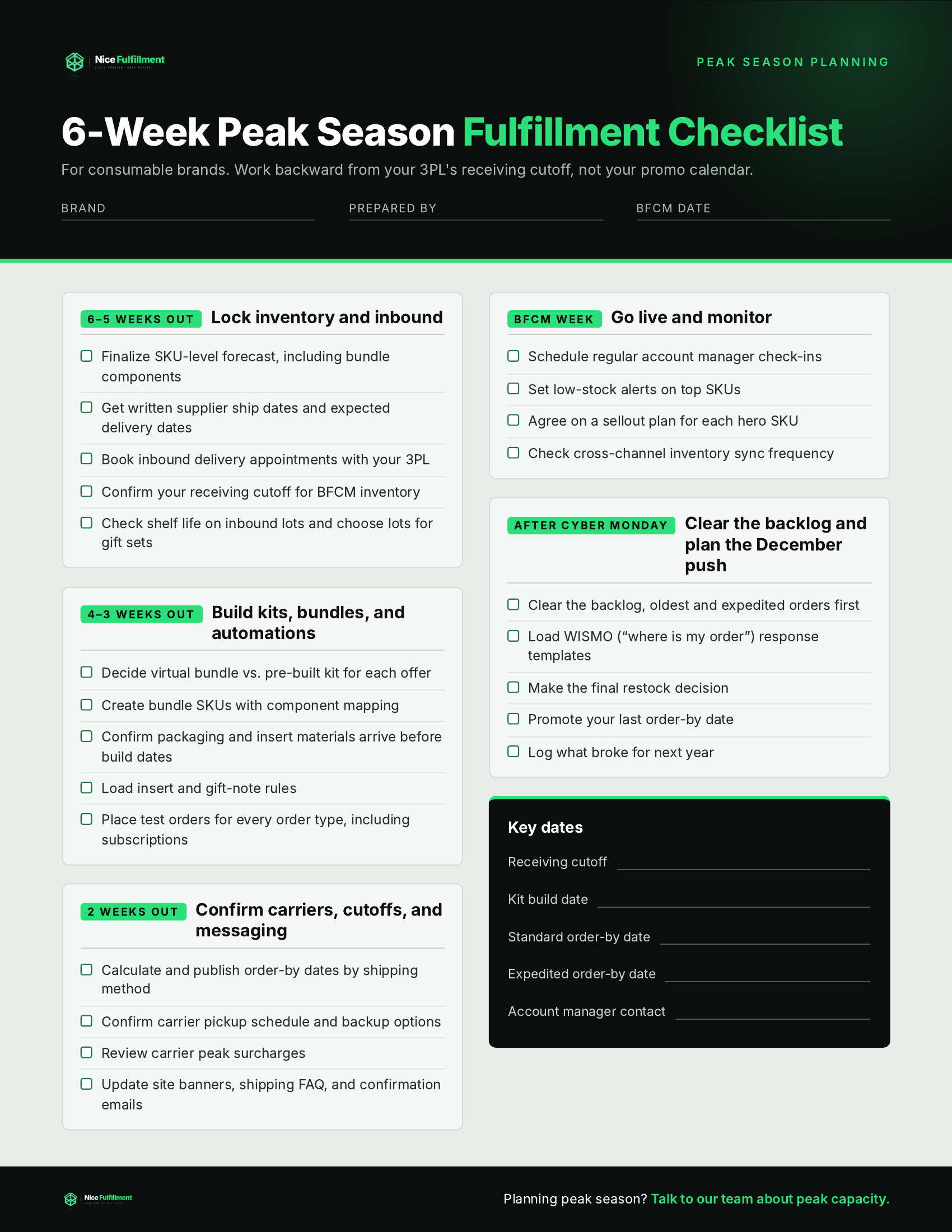
The checklist below puts this whole timeline on one page.
Your Printable 6-Week Peak Season Fulfillment Checklist
Get the printable 6-week peak season fulfillment checklist as a PDF you can share with your team — use the download below.
6 to 5 weeks out
- Finalize SKU-level forecast, including bundle components
- Get written supplier ship dates and expected delivery dates
- Book inbound delivery appointments with your 3PL
- Confirm your receiving cutoff for BFCM inventory
- Check shelf life on inbound lots and choose lots for gift sets
4 to 3 weeks out
- Decide virtual bundle vs. pre-built kit for each offer
- Create bundle SKUs with component mapping
- Confirm packaging and insert materials arrive before build dates
- Load insert and gift-note rules
- Place test orders for every order type, including subscriptions
2 weeks out
- Calculate and publish order-by dates by shipping method
- Confirm carrier pickup schedule and backup options
- Review carrier peak surcharges
- Update site banners, shipping FAQ, and confirmation emails
BFCM week
- Schedule regular account manager check-ins
- Set low-stock alerts on top SKUs
- Agree on a sellout plan for each hero SKU
- Check cross-channel inventory sync frequency
After Cyber Monday
- Clear the backlog, oldest and expedited orders first
- Load WISMO response templates
- Make the final restock decision
- Promote your last order-by date
- Log what broke for next year
Peak Season Is Decided Before Black Friday Starts
By the time BFCM week arrives, your Q4 fulfillment has already been decided. The week itself shows you how well the planning went.
That planning lands on someone. Chasing supplier dates, booking receiving appointments, building and testing kits, recalculating order-by dates, and making a sellout call at 7 a.m. on Black Friday usually fall to a founder or ops lead who also has a promo to run.
A 3PL should carry that weight with you. Nice Fulfillment is a third-party logistics provider serving DTC and ecommerce brands, with warehouses in Charleston, SC and Salt Lake City, UT.
When a hero SKU sells out on Black Friday morning, our accounts team responds to support emails within the hour, and our on-site account managers work directly with the warehouse floor, so the person answering can see your orders. When you’re setting order-by dates, our bi-coastal network puts more of your customers within shorter ground transit, which means later deadlines for more of them. We maintain a 99.7% on-time fulfillment rate and a 2-day, 17-hour average shipping time (nicecommerce.com).
Download the printable 6-week peak season fulfillment checklist to share with your team, or talk to our team about peak capacity to see how we’d approach your season.